
Data Structure
This guide explains how NVECTA structures and manages events and user profiles, the core building blocks of your analytics data model. You will learn about the different attribute types (system, default, and custom), how they are captured, and how to design a schema that stays consistent as your product evolves.
In data warehouse parlance, events are your fact tables (the actions users take), while user profiles are your dimension tables (context about who those users are). Together they form the foundation for accurate tracking, analysis, and personalisation across your product.
User attributes
A user profile is a collection of attributes associated with an individual user. It works as a key-value store that holds the current state of that user. Profiles are connected to events through a distinct id (nv_uid): event.nv_uid = user.nv_uid.
In NVECTA, a user profile brings together system-generated identifiers, demographic details, and custom attributes you define. At a minimum, each profile carries one distinct identifier, such as userID, email, or mobile. To pass these identifiers and attributes from your website, see Tracking Users.
How user profiles are stored
Behind the scenes, NVECTA keeps user data in a structured table. Each row is a single user profile and each column is a user attribute (for example Name, Email, Department). Attribute values are updated as new information arrives.
| nv_uid | Name | Department | |
|---|---|---|---|
| 101 | David | [email protected] | Engineering |
| 202 | Emma | [email protected] | Product |
| 303 | Liam | [email protected] | Design |
Concepts
-
System attributes: core identifiers and reserved fields such as nv_uid, name / first_name / last_name, email, mobile, and first-seen and last-seen timestamps.
-
Default attributes: metadata NVECTA derives and maintains for you, including City, Country, Region Code and Time Zone, refreshed whenever the profile changes.
-
Custom attributes: business-specific traits that extend profile context, such as plan, account_tier or LTV, so you can segment and personalise beyond the system and default fields.
Custom user attributes guidelines
| Rule | Details |
|---|---|
| Allowed data types | String (including String Array), Integer (Number), Boolean, Date (including Timestamp), Object and Nested Object |
| Maximum number of custom user attributes per data type | String up to 200, Number up to 100, Boolean up to 20, Date (including Timestamp) up to 20, Object up to 20, Array of Objects up to 5 |
| Maximum number of unique custom user attributes allowed | 255 |
| Maximum length of a String data type for an attribute | 1000 characters |
| Maximum length of an attribute key | 50 characters |
| Allowed characters in attribute names | Alphanumerics, white space or an underscore only, for example first name or last_name |
Event attributes
vents represent actions that occur within your product. Each event includes details describing that action — such as time, device, browser, and location. At minimum, every event should include:
-
Event name
-
Timestamp
-
Distinct identifier (such as user_id, email, or mobile)
Events can also be joined with user profiles to provide additional context and enrichment. To send custom events and their attributes from your website, see Tracking Events.
Concepts
-
System attributes: captured automatically when an event occurs. They cover details such as device, operating system, IP-based location, language, platform, timezone, UTM parameters and page or app context. Coverage varies by platform (Web, Android, iOS).
-
Custom attributes: business-defined details that you add to specific events, for example order_id, plan_tier or quantity.
If you think in database terms, events are like tables and attributes are like columns. If you are used to Google Analytics, events are like hits and attributes are like dimensions.
Examples
-
A Page Viewed event might include an attribute called Page URL, holding the page that was viewed.
-
A Signed Up event could include Signup Type, showing whether the signup was organic or referral.
-
A Song Played event might include Song Name, containing the name of the song.
-
An Order Completed event could include Items, a list of objects describing each item with its name, category and price.
Use cases
You can filter, group and analyse events using their attributes to answer questions such as:
-
Which pages do users visit before the pricing page?
-
How many sign-ups came from organic sources compared with referrals?
-
Which song is played most often?
-
How many orders included shoes, and what was the total amount spent on them last month?
Best practices: keep events action-oriented
Define events around user actions rather than making them too broad or too narrow. Use event attributes to add context instead of creating several events that describe similar actions.
-
To analyse page navigation, track a single Page Viewed event with a Page Name attribute (for example /home or /pricing) instead of separate Home Page Viewed and Pricing Page Viewed events.
-
To track items added to a cart, use one Add to Cart event with an Item attribute (Shirt, Hoodie, Socks) instead of Add Shirt to Cart, Add Hoodie to Cart and Add Socks to Cart.
-
To track button interactions on a single screen, record one Button Clicked event with Color and Button Name attributes instead of Blue Button Clicked and Checkout Button Clicked.
-
To capture genuinely different user actions, create distinct events such as Song Played, Profile Updated and Logout, each with its own attributes, rather than one generic Button Clicked event carrying Button Name values like Play, Profile and X.
Event guidelines
The limits and naming rules that apply to event names and event attributes are summarised below.
| Guideline | Details |
|---|---|
| Maximum unique event names allowed | 500 |
| Event name length | Under 255 characters. Names are case-sensitive, so sign_up_completed and Sign_Up_Completed are two different events |
| Characters allowed in event names | No special characters other than a space, an underscore or a hyphen |
| Event attribute name length | Under 50 characters. Attribute names are case-sensitive |
| String attribute value length | Under 255 characters (255 bytes) |
| Maximum attributes per event | 255 |
| Maximum attributes per data type on a single event | String up to 200, Number up to 100, Boolean up to 20, Date (including Timestamp) up to 20, Object up to 20, Array of Objects up to 5 |
| Type locking | The first value sent for an attribute fixes its data type. If you later send a different type, for example quantity: "five" after quantity: 5, the mismatched values will not flow to your NVECTA dashboard. Introduce a new attribute such as quantity_v2 with the correct type instead of changing the original |
| Naming convention | Use snake_case for event names and attribute names. Names are case-sensitive and hard to rename later, so choose a durable scheme from the start |
| SDK loading | The integration code loads and initialises the NVECTA SDK asynchronously, so it does not affect the page load time of your website |
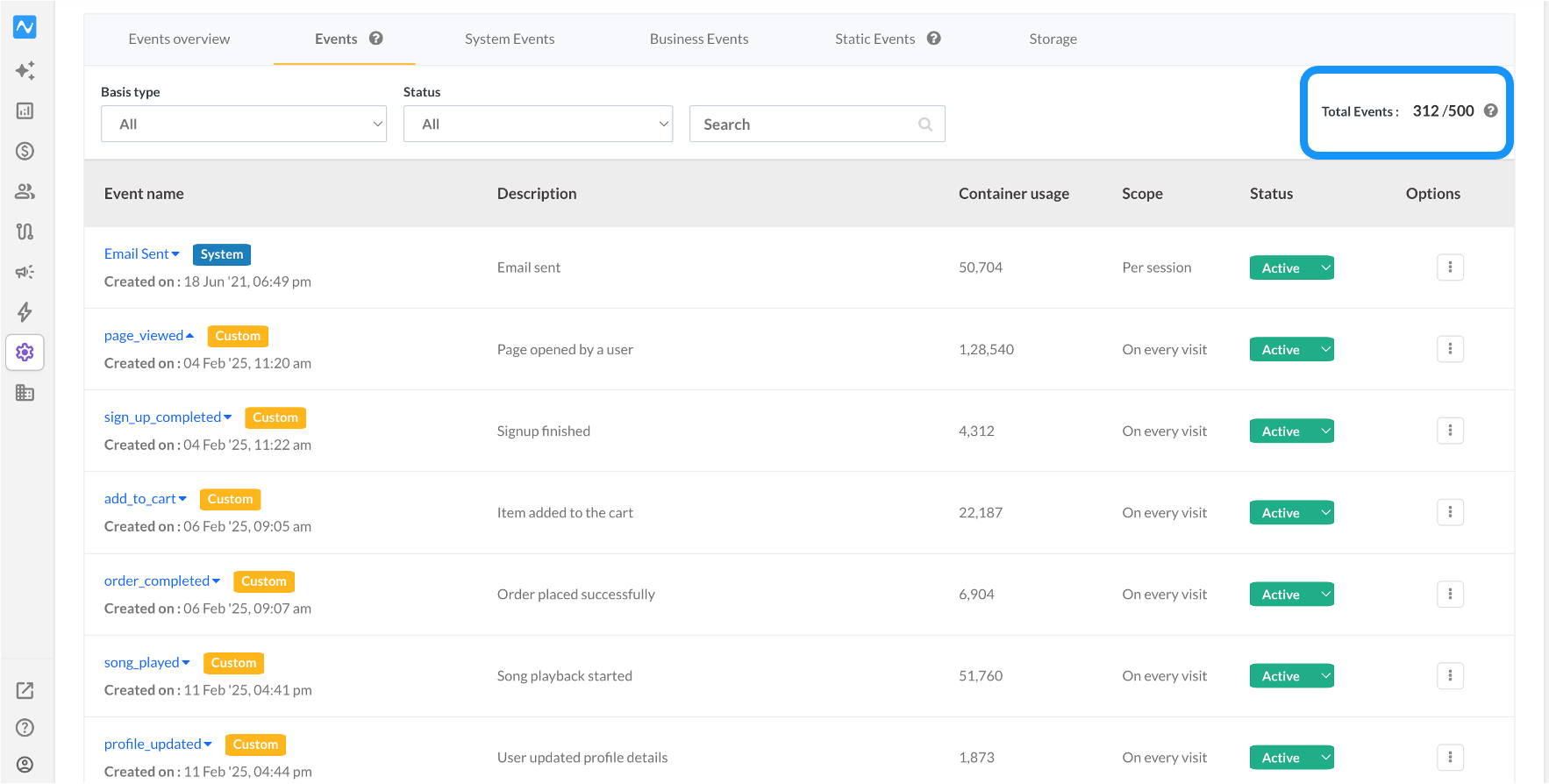
To check your unique event usage in the NVECTA dashboard, go to Settings > Events. The Total Events counter on the Events tab shows how many of the 500 unique event names you have used.
Naming conventions that last
Because keys are case-sensitive and hard to rename, pick a durable scheme before you start sending data.
-
Use snake_case for event names and attribute names, because it holds up in code, in storage and in BI tools.
-
Use object_verb for event names: page_viewed, song_played, order_completed.
-
Keep names short but specific, so prefer signup_type over type.
-
If you need friendlier labels for reporting, NVECTA lets you set display names for analytics reports without changing the underlying keys.
Attribute data types
Choosing the right data type for an attribute is fundamental to useful analysis. The breakdown below covers each type, its characteristics and how it behaves in an analytics context.
String
A String is an alphanumeric value and the default data type for any value that does not match another type.
-
Represents text-based data.
-
Examples: User ID = "Bruno_21", Status = "Active".
-
Limits: an event attribute string is limited to 255 bytes, and the number of characters this allows depends on the character encoding. A user profile attribute string can be up to 1000 characters.
Numeric
A Numeric attribute can be an integer or a decimal, and it is the type to use for anything quantitative.
-
Represents numerical data.
-
Examples: Cost = 15.00, Quantity = 5.
-
Enables mathematical operators such as sum, median and percentile in reports.
Boolean
A Boolean attribute represents a true or false value.
-
Represents binary states.
-
Examples: true, false.
-
Typecasting: non-boolean values are converted automatically, so 0, null, undefined and empty strings are treated as false, while any non-zero or non-empty value is treated as true.
Date
A Date stores a calendar date only, with no time and no timezone.
-
Represents a day on the calendar, in ISO-8601 date-only format.
-
Examples: renewal_date = "2025-12-01", dob = "1998-07-14".
-
Limits: format YYYY-MM-DD, with no time or timezone. Keep it consistent across sources.
Timestamp
A Timestamp stores an exact point in time and includes a timezone.
-
Represents the moment an action occurred, in ISO-8601 with a timezone (prefer UTC Z).
-
Examples: timestamp = "2025-09-10T12:34:56Z", client_timestamp = "2025-09-10T18:04:56+05:30".
-
Limits: must include a timezone (Z or ±HH:MM). Avoid locale strings such as "09/10/25 12:34 PM".
Object
An Object is a key-value map that groups related attributes, such as an address or a set of device capabilities.
{
  "shipping_address": {
    "street": "42 MG Road",
    "city": "Mumbai",
    "zip": "400001",
    "country_code": "IN"
  }
}
Limits: less than 50 characters. An Object counts as one Object-type attribute towards the per-type limits, and the strings inside it still follow the string limits.
Nested Object
A Nested Object is used when a group contains another group, for example a payment that carries card details.
{
  "payment": {
    "method": "credit_card",
    "amount": 119.93,
    "card": {
      "brand": "Visa",
      "last4": "4242",
      "exp_month": 12,
      "exp_year": 2030
    }
  }
}
Limits: 8 KB for an event attribute and 255 characters for a user profile attribute, with up to 25 keys per nested object and a maximum nesting depth of 3.
Array
An Array is an ordered list of values such as strings or numbers. Use it for tags, categories or line items.
{
  "tags": ["summer-sale", "new-arrival", "bestseller"],
  "applied_discounts": ["SUMMER20", "FIRST10"]
}
Limits: each item obeys its own data-type limits, so strings stay within 255 characters.
Array of Objects
An Array of Objects is a list in which each element is an object of key-value pairs. Use it when each item needs several attributes, such as sku, name, price and qty, for records like product items, transactions or users.
{
  "items": [
    { "sku": "SN-001", "name": "AirStride Pro", "price": 99.95, "qty": 1 },
    { "sku": "SK-042", "name": "Cotton Ankle Socks", "price": 9.99, "qty": 2 }
  ]
}
Limits: each item obeys its own data-type limits, for example strings up to 255 characters. An array of objects cannot be nested. For example:
Not allowed: object nesting inside an array of objects
{
  "items": [
    {
      "sku": "SN-001",
      "name": "AirStride Pro",
      "price": 99.95,
      "qty": 1,
      "tags": [
        { "tag": "summer-sale" },
        { "tag": "clearance" }
      ]
    },
    {
      "sku": "SK-042",
      "name": "Cotton Ankle Socks",
      "price": 9.99,
      "qty": 2,
      "tags": [
        { "tag": "cotton" },
        { "tag": "bundle" }
      ]
    }
  ]
}
Allowed option A: make inner arrays strings
{
  "items": [
    {
      "sku": "SN-001",
      "name": "AirStride Pro",
      "price": 99.95,
      "qty": 1,
      "tags": ["summer-sale", "clearance"]
    },
    {
      "sku": "SK-042",
      "name": "Cotton Ankle Socks",
      "price": 9.99,
      "qty": 2,
      "tags": ["cotton", "bundle"]
    }
  ]
}
Allowed option B: split into a separate array of objects (no inner arrays)
{
  "items": [
    { "sku": "SN-001", "name": "AirStride Pro", "price": 99.95, "qty": 1 },
    { "sku": "SK-042", "name": "Cotton Ankle Socks", "price": 9.99, "qty": 2 }
  ],
  "item_tags": [
    { "sku": "SN-001", "tag": "summer-sale" },
    { "sku": "SN-001", "tag": "clearance" },
    { "sku": "SK-042", "tag": "cotton" },
    { "sku": "SK-042", "tag": "bundle" }
  ]
}
Updated 24 days ago