
Tracking Methods
Tracking users and events accurately is fundamental for understanding customer behavior, optimizing marketing strategies, and driving business growth. NVECTA offers multiple methods to capture user data through different channels and integrations.
This guide helps you select the most suitable tracking method based on your architecture, data needs, and infrastructure.
At a Glance
| Method | What It Does | Latency |
|---|---|---|
| Client-Side SDKs | Captures user interactions directly from the browser or mobile app | Real-time |
| Server-Side SDKs | Sends events from your backend servers to NVECTA | Real-time |
| Integrations | Imports data from third-party services or file uploads | Batch |
| Warehouse Connectors | Syncs data from your existing data warehouse | Batch / Scheduled |
| Direct API Ingestion | Sends events via raw HTTP requests without using an SDK | Real-time |
1. Client-Side SDKs
Client-side SDKs are libraries you install in your website or mobile app code. They run on the user's device (browser or the phone) and capture interactions as they happen.
How It Works
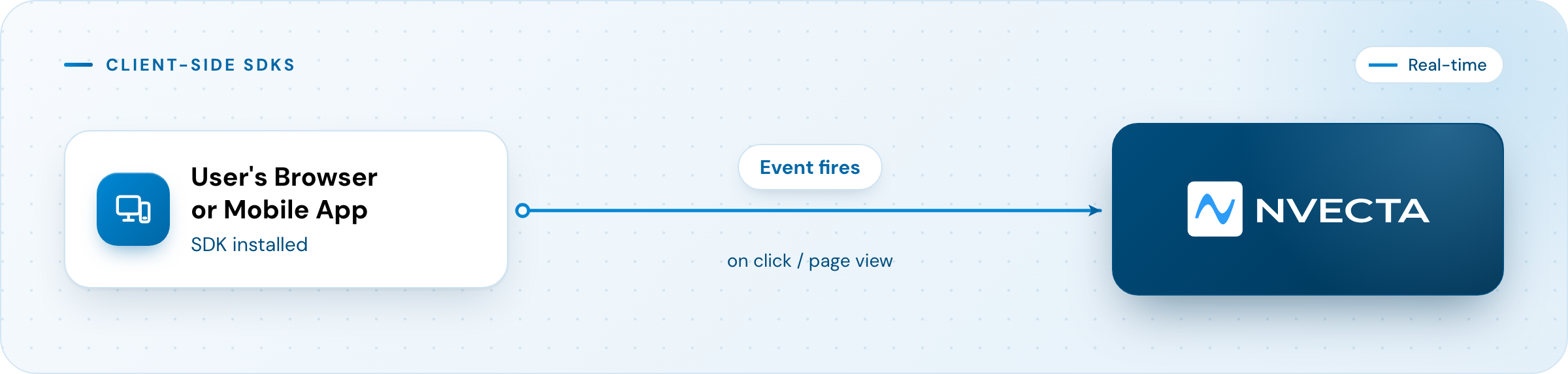
The SDK automatically captures device-level context, such as device type, OS, browser, screen resolution, location, and UTM parameters, along with any custom events you define.
When to Use
- You want to track what users do on your website or app, such as page views, button clicks, form submissions, scroll depth.
- You need device and browser context captured automatically.
- You want the quickest implementation path; install the SDK, define events, and start tracking.
- You're on a platform like Shopify, Magento, or WordPress. Use pre-built plugins for no-code setup.
Examples
Ecommerce: Track product views and cart additions to trigger abandoned cart emails.
nvecta.track("add_to_cart", {
  product_name: "AirStride Pro",
  sku: "SN-001",
  price: 99.95
});
BFSI: Track loan application funnel steps to identify drop-off points.
nvecta.track("loan_application_started", {
  loan_type: "personal",
  requested_amount: 500000
});
Keep in Mind
- Client-side events can be blocked by ad blockers or browser privacy settings.
- You need access to your application's codebase to install the SDK.
- Always ensure user consent compliance (GDPR, CCPA) before tracking.
2. Server-Side SDKs
Server-side SDKs allow your backend systems to send user and event data directly to NVECTA. The data never touches the user's browser, it flows server-to-server.
How It Works
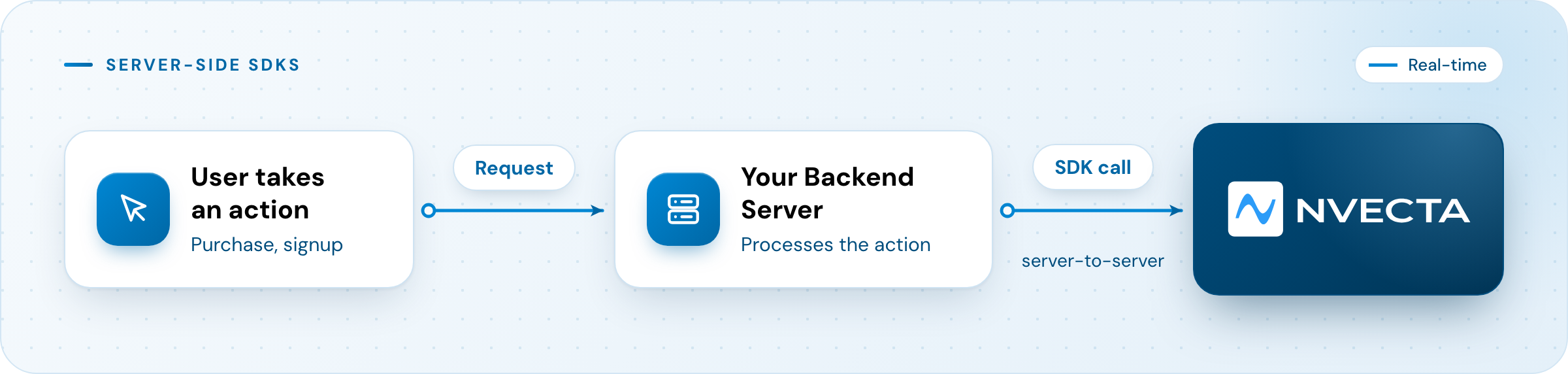
Your server processes the business logic (e.g., confirms payment, creates account) and then sends the event to NVECTA via an SDK call.
When to Use
- You're tracking business-critical events (such as purchases, subscription changes, refunds), where every event must be captured without fail.
- The event doesn't happen in a browser or app, it originates from a payment gateway callback, an internal system, or a background job.
- You want reliability, server-side calls aren't affected by ad blockers or browser restrictions.
- You need to send sensitive data that shouldn't be exposed in client-side code.
Examples
Ecommerce: Track confirmed purchases after payment gateway webhook.
nvecta.track(
  user_id="user_101",
  event="order_completed",
  properties={
    "order_id": "ORD-88421",
    "total_amount": 119.93,
    "payment_method": "credit_card"
  }
)
BFSI: Track credit score results from backend underwriting system.
nvecta.track(
  user_id="user_5023",
  event="loan_application_scored",
  properties={
    "credit_score": 742,
    "risk_level": "low",
    "approval_status": "approved"
  }
)
Keep in Mind
- Requires more engineering effort than client-side SDK.
- Does not automatically capture front-end context (UTM parameters, device info) unless you explicitly pass it.
- Use consistent user identifiers across client and server events.
3. Integrations (AWS S3, SFTP, Branch, AppsFlyer, and More)
Integrations let you import data from third-party services or upload files in bulk, without writing custom API calls.
How It Works
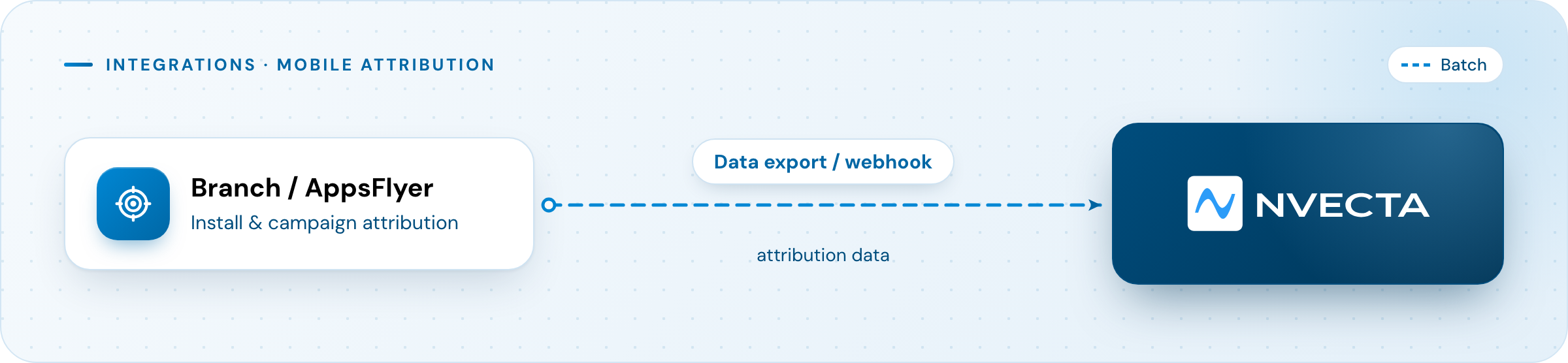
Mobile Attribution (Branch, AppsFlyer):
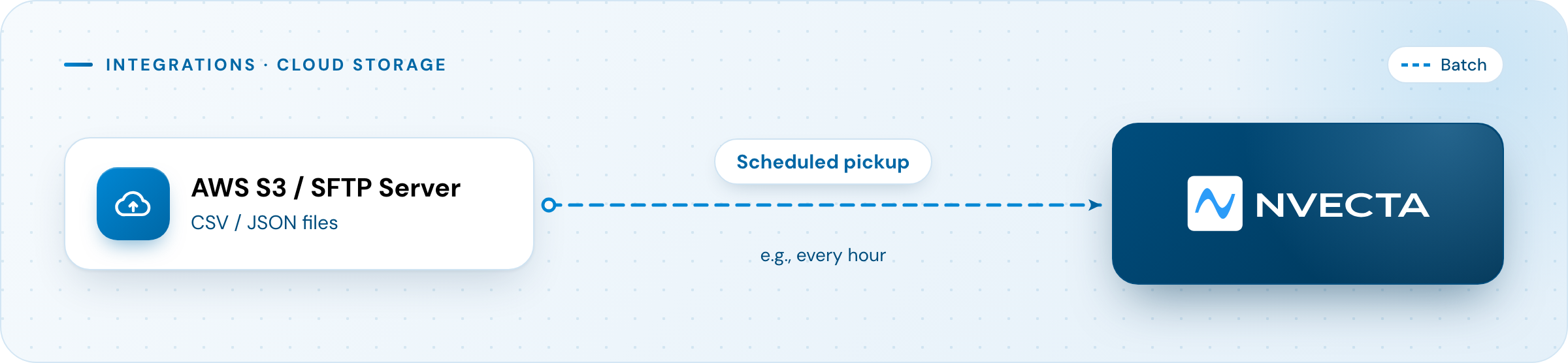
Cloud Storage (AWS S3, SFTP):
When to Use
- You want to consolidate data from third-party tools into a single customer view.
- You need to import large datasets or historical data in bulk.
- You want to analyze marketing attribution data alongside in-app behavior.
Examples
Ecommerce: Import daily offline POS sales data from S3 to create cross-channel view.
POS System → CSV export → AWS S3 → NVECTA (nightly sync)
BFSI: Import AppsFlyer attribution data to measure campaign ROI on loan applications.
AppsFlyer → Data Export → NVECTA (joins with in-app events)
Keep in Mind
- Data arrives in batches, not real-time.
- Map data fields carefully. Column names must match expected attribute names.
- Maintain secure credentials and rotate access keys regularly.
4. Warehouse Connectors (Redshift, Snowflake, BigQuery, and More)
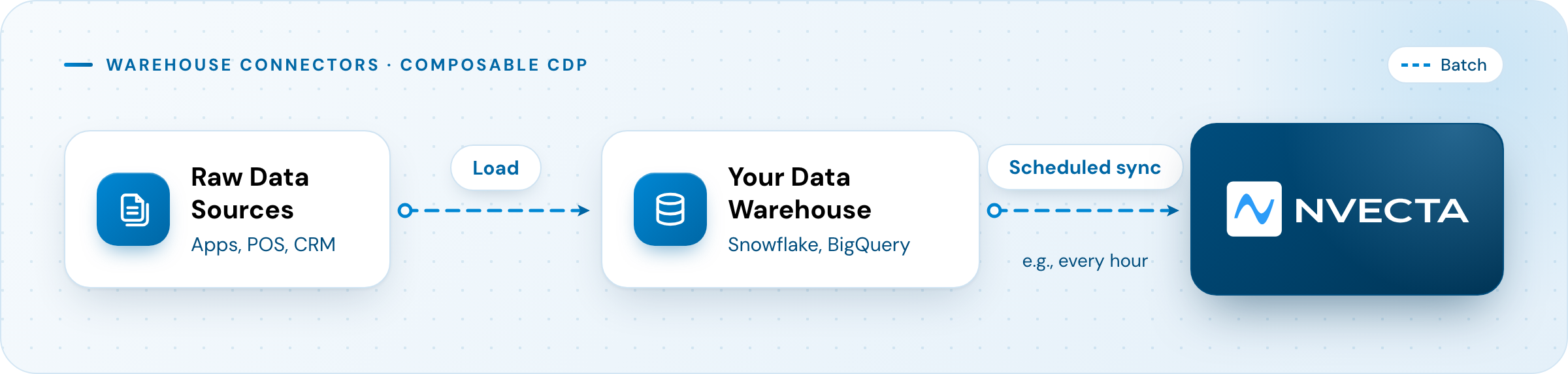
If your company uses a data warehouse as the central source of truth, Warehouse Connectors sync cleaned, modeled data directly into NVECTA. This is called as "Composable CDP."
How It Works
When to Use
- Your data warehouse is already your single source of truth.
- You want to sync complex, modeled data:
lifetime_value,churn_risk_score, SQL-defined segments. - Your data team wants centralized governance over what data enters NVECTA.
Examples
Ecommerce: Sync modeled customer profiles with LTV and churn risk from Snowflake.
SELECT
  user_id,
  SUM(order_total) AS lifetime_value,
  CASE
    WHEN MAX(order_date) < CURRENT_DATE - 90 THEN 'high'
    ELSE 'low'
  END AS churn_risk
FROM orders
GROUP BY user_id;
BFSI: Sync policy data and risk tiers from Redshift for personalized renewal campaigns.
SELECT
  user_id,
  COUNT(policy_id) AS active_policies,
  MIN(renewal_date) AS next_renewal,
  risk_tier
FROM policies
WHERE status = 'active'
GROUP BY user_id, risk_tier;
Keep in Mind
- Data arrives on a schedule (hourly, daily), not real-time.
- Maintain proper access controls: connector needs read access to specific tables only.
- Monitor query costs: frequent syncs can increase warehouse compute costs.
5. Direct API Ingestion
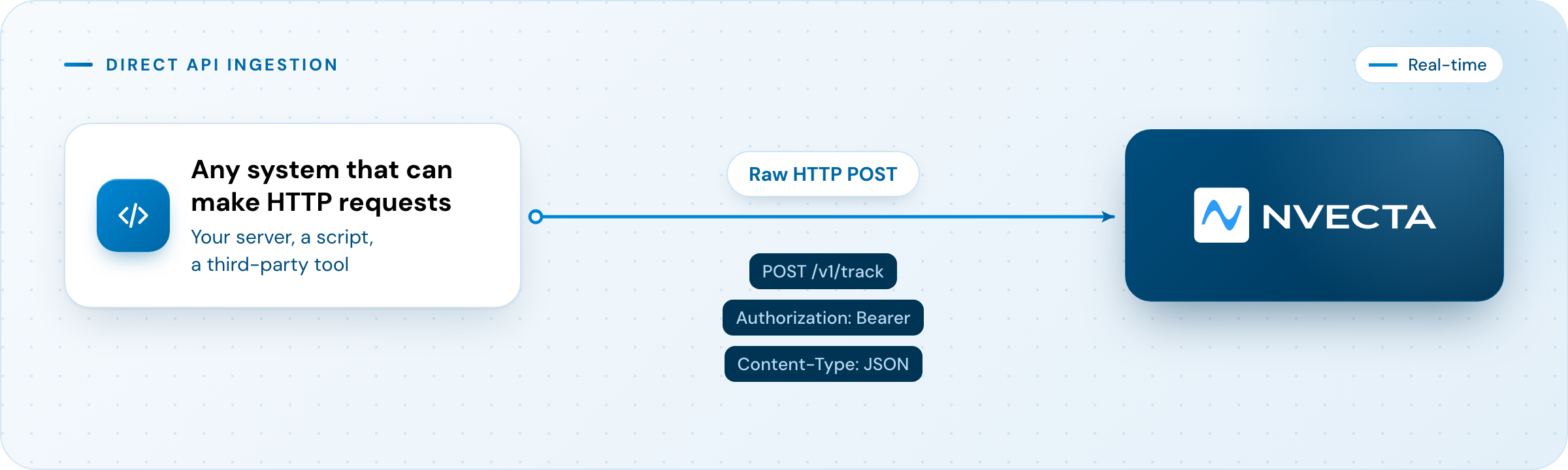
Direct API ingestion lets you send data to NVECTA by making raw HTTP requests, without using any SDK. You manually construct the request payload and send it to our API endpoint.
How It Works
When to Use
- No SDK is available for your language or platform, such as legacy systems, uncommon languages, or embedded devices.
- You're building a custom integration or a one-off data migration script.
- You're integrating from a third-party tool that can make HTTP calls but can't run SDK code.
- You want maximum control over the request, custom headers, retry logic, batching.
Examples
Ecommerce: Send inventory updates from a legacy warehouse system.
curl -X POST https://api.notifyvisitors.com/v1/track \
  -H "Authorization: Bearer YOUR_API_KEY" \
  -H "Content-Type: application/json" \
  -d '{
    "event": "inventory_updated",
    "user_id": "system_inventory",
    "properties": {
      "sku": "SN-001",
      "new_stock": 45
    }
  }'
BFSI: Send loan disbursement events from a nightly batch job.
curl -X POST https://api.notifyvisitors.com/v1/track \
  -H "Authorization: Bearer YOUR_API_KEY" \
  -H "Content-Type: application/json" \
  -d '{
    "event": "loan_disbursed",
    "user_id": "user_5023",
    "properties": {
      "loan_id": "LN-88421",
      "amount": 500000
    }
  }'
Keep in Mind
- More manual effort: you handle retries, error handling, and rate limiting yourself.
- No automatic context capture: you must explicitly include every property.
- Secure your API key: never expose it in client-side code.
Hybrid Approach: Combining Methods
For most companies, the best strategy combines multiple tracking methods.
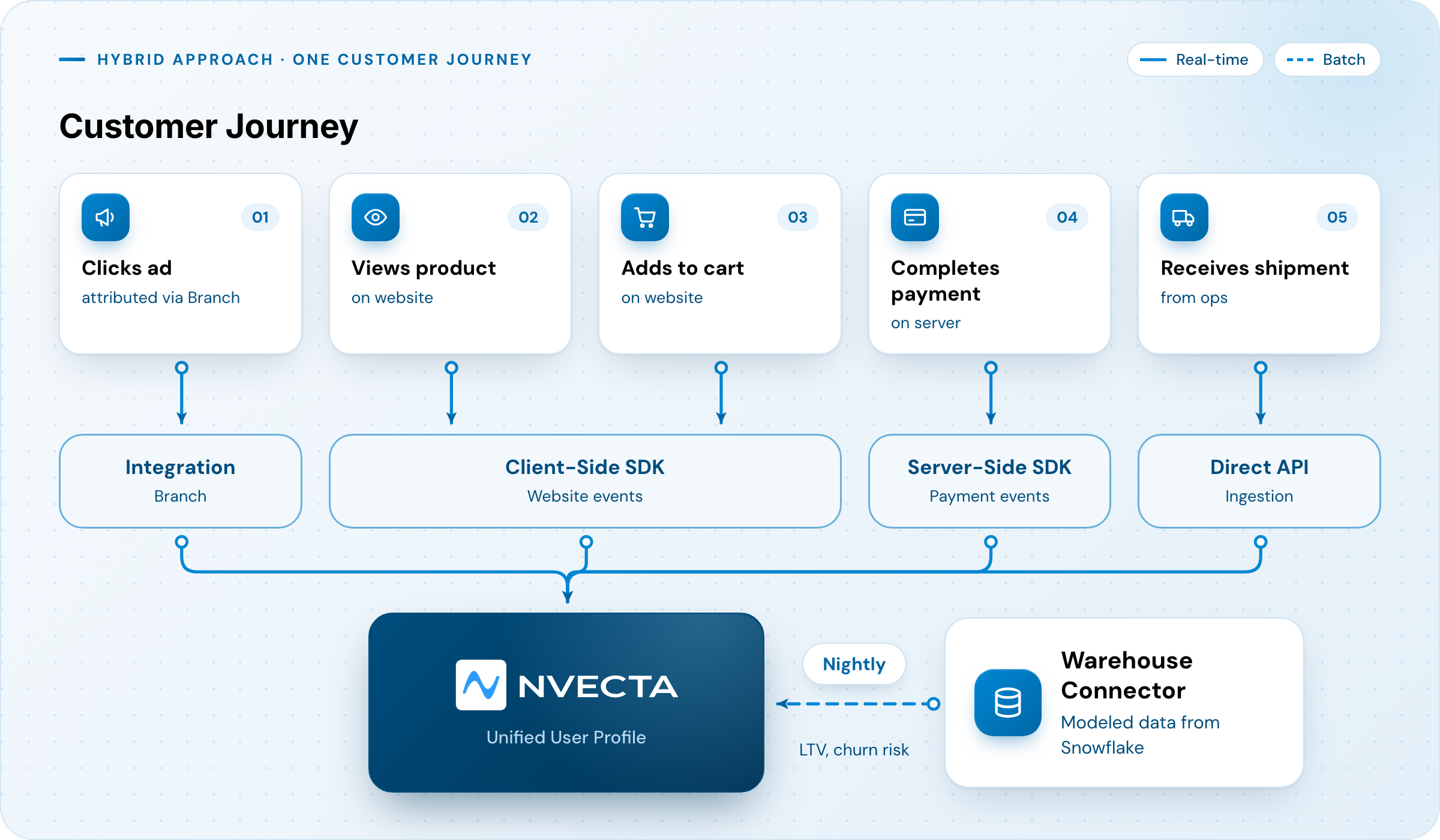
| Stage | Method | Why |
|---|---|---|
| Ad click → Install | Integration (Branch) | Attribution data |
| Product views, cart | Client-Side SDK | Real-time behavior with device context |
| Payment confirmation | Server-Side SDK | Reliable, not affected by ad blockers |
| Shipment updates | Direct API | Legacy OMS with no SDK |
| LTV, churn risk | Warehouse Connector | Modeled metrics from data team |
Summary
| Method | Best For | Latency | Effort |
|---|---|---|---|
| Client-Side SDK | Frontend interactions (web/app) | Real-time | Low |
| Server-Side SDK | Secure backend events | Real-time | Medium |
| Integrations | Third-party data, file uploads | Batch | Low–Medium |
| Warehouse Connectors | Modeled data, centralized governance | Batch | Medium |
| Direct API | Legacy systems, custom scripts | Real-time | Medium–High |
Updated 15 days ago