
Android Integration
Add the permissions mentioned below to your app’s manifest.xml file.
<manifest….>
   <uses-permission android:name="android.permission.SYSTEM_ALERT_WINDOW"/>
   <uses-permission android:name="android.permission.WAKE_LOCK"/>
   <uses-permission android:name="android.permission.ACCESS_NETWORK_STATE"/>
   <uses-permission android:name="android.permission.ACCESS_WIFI_STATE"/>
   <uses-permission android:name="android.permission.ACCESS_FINE_LOCATION"/>
   <uses-permission android:name="android.permission.CHANGE_NETWORK_STATE"/>
   <uses-permission android:name="android.permission.CHANGE_WIFI_STATE"/>
Configure AndroidManifest.xml
Add the permissions mentioned below to your app’s manifest.xml file.
<manifest….>
   <uses-permission android:name="android.permission.SYSTEM_ALERT_WINDOW"/>
   <uses-permission android:name="android.permission.WAKE_LOCK"/>
   <uses-permission android:name="android.permission.ACCESS_NETWORK_STATE"/>
   <uses-permission android:name="android.permission.ACCESS_WIFI_STATE"/>
   <uses-permission android:name="android.permission.ACCESS_FINE_LOCATION"/>
   <uses-permission android:name="android.permission.CHANGE_NETWORK_STATE"/>
   <uses-permission android:name="android.permission.CHANGE_WIFI_STATE"/>

 <application>
    <meta-data
        android:name="notifyvisitors_bid"
        android:value="xxxx" />
    <meta-data
        android:name="notifyvisitors_bid_e"
        android:value="xxxxxxxxxxxxxxxxxxxxxxxxxxxxxxxx"/>
 </application>
</manifest>
Note:
Kindly login to your NotifyVisitors account to see your credentials.
Initialize SDK
A. Incorporate our registration method into the onCreate() function of your application class. If you haven't created your own yet, go ahead and set one up.
package com.example;

import android.app.Application;
import com.rn_notifyvisitors.RNNotifyvisitorsModule;

public class ApplicationClass extends Application {

   // NOTE: Replace the below with your own NOTIFYVISITORS_BRAND_ID & NOTIFYVISITORS_BRAND_ENCRYPTION_KEY
   private String NOTIFYVISITORS_BRAND_ENCRYPTION_KEY = "##################################";
   private int NOTIFYVISITORS_BRAND_ID = #####;

   @Override
   public void onCreate() {
       super.onCreate();

       RNNotifyvisitorsModule.register(this, NOTIFYVISITORS_BRAND_ID, NOTIFYVISITORS_BRAND_ENCRYPTION_KEY);

       SoLoader.init(this, false);
   }
}
package com.example

import android.app.Application
import com.rn_notifyvisitors.RNNotifyvisitorsModule

class MyApplication : Application() {

   // NOTE: Replace the below with your own NOTIFYVISITORS_BRAND_ID & NOTIFYVISITORS_BRAND_ENCRYPTION_KEY
   private val NOTIFYVISITORS_BRAND_ENCRYPTION_KEY: String = "##################################"
   private val NOTIFYVISITORS_BRAND_ID: Int = #####

   override fun onCreate() {
       super.onCreate()

       RNNotifyvisitorsModule.register(this, NOTIFYVISITORS_BRAND_ID, NOTIFYVISITORS_BRAND_ENCRYPTION_KEY);

       SoLoader.init(this, false)
   }
}
B. Set android:allowBackup to false.
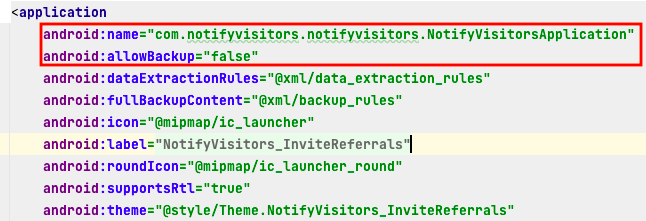
initialize application class and allow backup
A. If you have an Application class Otherwise skip this step.
Import below package
import com.rn_notifyvisitors.RNNotifyvisitorsModule;
Call the above method in onCreate()
RNNotifyvisitorsModule.register(this);

//Example

public void onCreate() {
    super.onCreate();
    RNNotifyvisitorsModule.register(this);
    SoLoader.init(this, /* native exopackage */ false);
}
B. If you don't have an Application class. Then add the below line to your app manifest.xml.
android:name="com.notifyvisitors.notifyvisitors.NotifyVisitorsApplication"
C. Set android:allowBackup to false.
initialize application class and allow backup
Updated 5 months ago