
Push Notification Troubleshooting
This article covers the five issues most often reported for iOS push:
- Push subscribers not showing in NVECTA
- Error while sending push from NVECTA
- Rich push delivered as standard push without media
- Push delivered but delivered stats not coming
- Push click redirection not working
Work through each Part in order; every step assumes the one before it passed.
Before you start, confirm the SDK is initialised in the app as described in Integration, and that push is configured in the panel and in the app as described in Push Notifications. Several checks below read the Xcode console, so switch SDK logging on first as described in Enable and Collect SDK Logs.
Part 1 — Push subscribers not showing in NVECTA
If a device has installed the app but never appears in NVECTA as a push subscriber, registration is failing at one of four points. Work through the checks in order; the first check that fails tells you where the flow breaks.
A. Verify the Brand ID
Where: Xcode console, filtered on the SDK tag [notifyvisitors].
Expected log line in the Xcode console: [notifyvisitors]-[INFO]: BrandID >>>>======>>>>> 123XX
The Brand ID is read from the nvBrandID key in your app info.plist and is picked up when the SDK is initialised. Confirm that the value in info.plist matches the Brand ID in NVECTA. If it does not match, check the following.
- nvBrandID is present in info.plist as a Number, and nvSecretKey is present as a String.
- The Brand ID and Secret Key are the pair issued to this brand in NVECTA.
- notifyvisitors.initialize(nvMode) runs in didFinishLaunchingWithOptions, before any other NVECTA call.
- nvMode is set to debug for a development build and live for an App Store build, so the SDK reports the environment you expect.
B. Verify the permission prompt is allowed
iOS does not issue an APNs device token until the user taps Allow on the system notification prompt, and the prompt is shown only once per install. Without a token the device can never register as a push subscriber. Confirm the following.
- UserNotifications is imported in AppDelegate and the class conforms to UNUserNotificationCenterDelegate.
- UNUserNotificationCenter.current().delegate is set to the AppDelegate immediately before registerPush is called.
- notifyvisitors.registerPush(withDelegate:app:launchOptions:) is called in didFinishLaunchingWithOptions, after SDK initialisation.
- The prompt is actually shown on the device and the user taps Allow.
- Notifications are still enabled for the app in the iOS Settings app, under Notifications.
- Push Notifications is added under Signing and Capabilities for the app main target.
- Background Modes is added, with Background fetch and Remote notifications selected.
- didRegisterForRemoteNotificationsWithDeviceToken fires and forwards the token with notifyvisitors.didRegisteredNotification(_:deviceToken:).
- didFailToRegisterForRemoteNotificationsWithError is implemented, so a registration failure prints a reason instead of failing silently.
- You are testing on a physical device, because a simulator is not issued an APNs device token.
- No other push SDK or native code takes over UNUserNotificationCenterDelegate after registerPush has run, because iOS calls whichever delegate was set last.
If permission was denied, the prompt does not appear again. Re-enable notifications for the app in iOS Settings, or reinstall the app, before retesting.
C. Confirm the device appears in the panel
Where: NVECTA panel, under Campaigns > App Push > Logs.
In the panel, open Campaigns > App Push > Logs, select the iOS platform filter, and confirm the device is listed with a Subscription ID, which is the ID you send to when firing a test push.
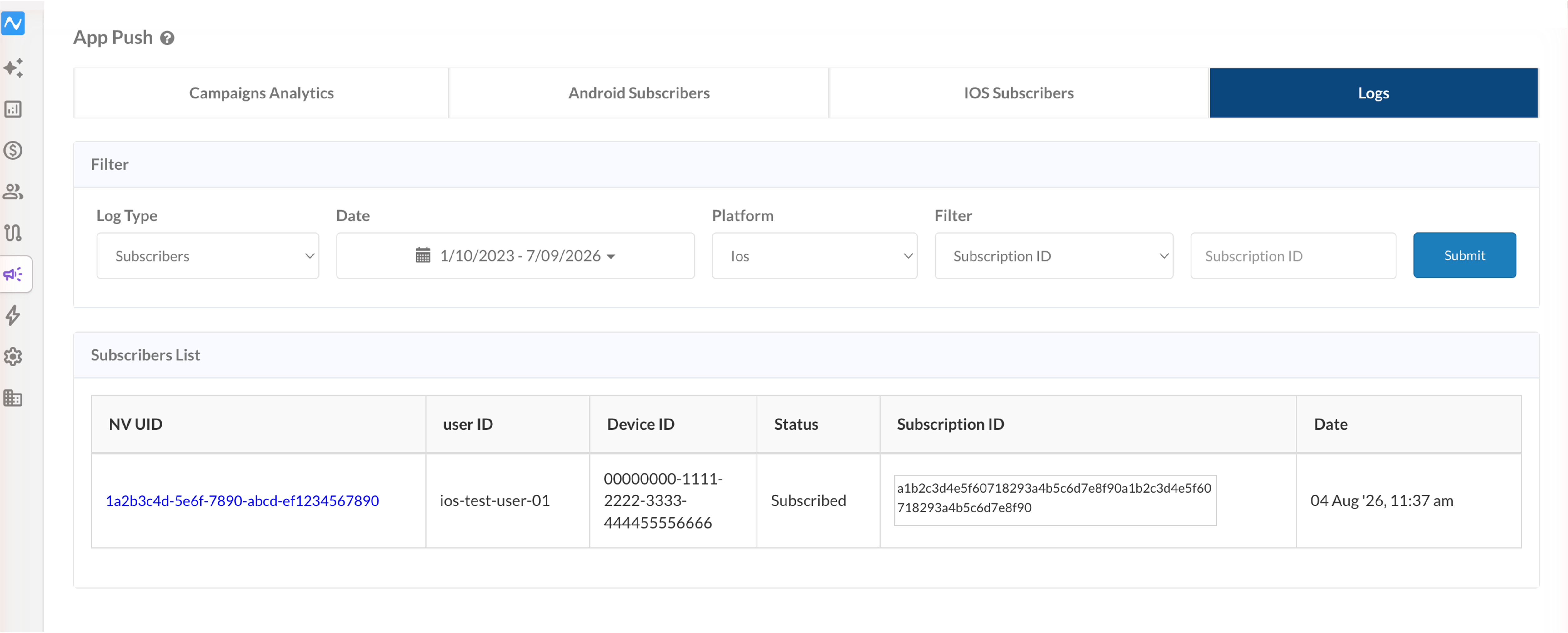
If the device is listed in the panel with a Subscription ID, registration is complete, so move to Step D. If it is not listed, either the SDK never received a usable APNs device token, which is covered in Steps A and B, or the subscription call itself is failing, which is covered in Step D.
D. Verify the subscription API request
If the Push Subscription ID is generated but the device still does not appear in NVECTA, the subscription call is failing. In the Xcode console, confirm the following.
- There are no authentication errors.
- There are no timeout or SSL failures.
- There are no HTTP or network exception logs.
- The device has a working internet connection, and outbound requests are not blocked by a proxy or VPN.
If the request fails, the SDK logs the reason. Use it to decide whether you are looking at a credential, a network or a payload problem.
Part 2 — Error while sending push from NVECTA
If NVECTA returns an error when the push is sent, the credentials saved in the panel do not match the app the push is going to. Credentials are uploaded under Settings > App Push > iOS, and two things have to line up: the bundle ID and the environment.
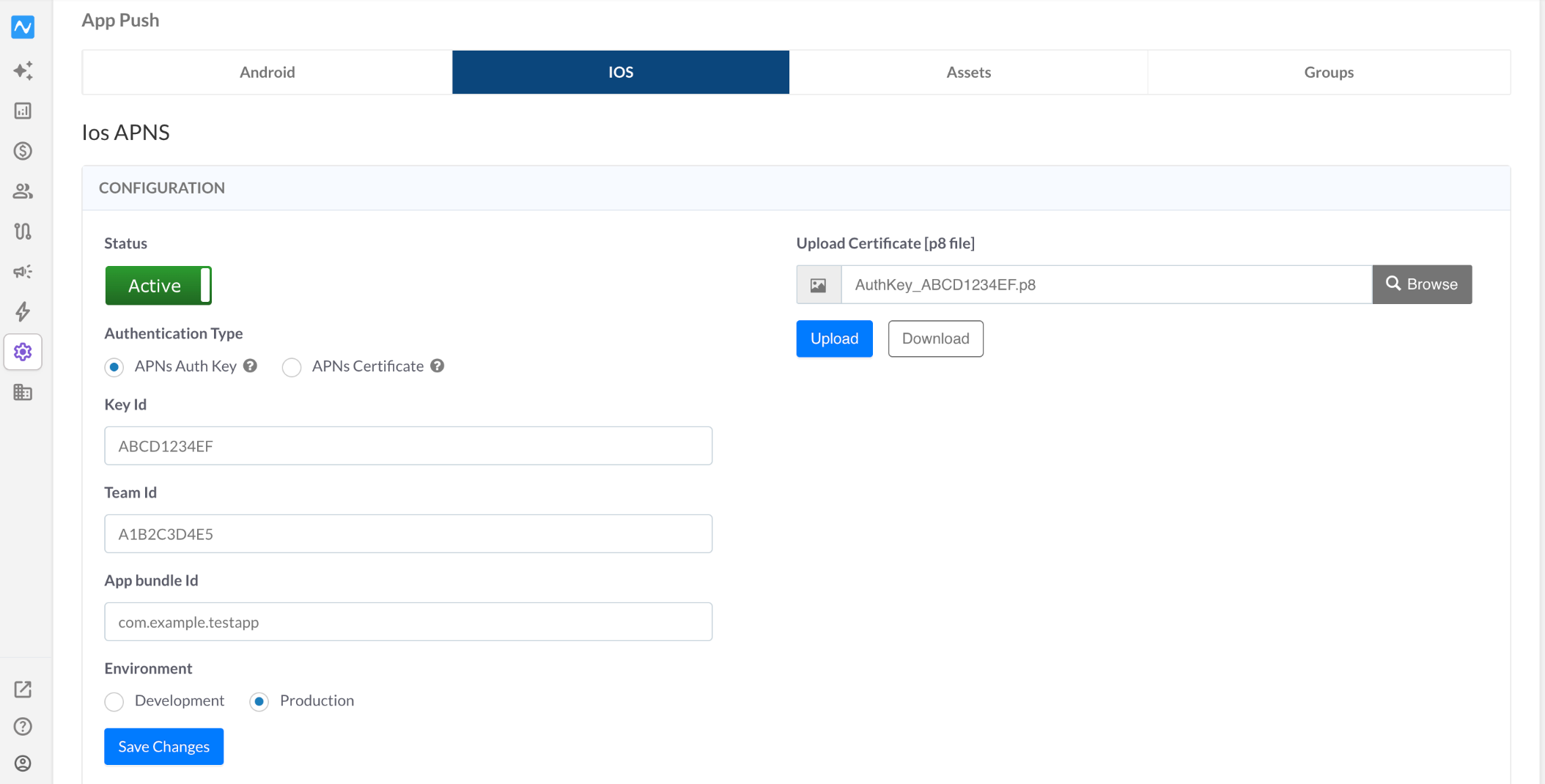
A. Verify the bundle ID against the APNS keys
With Authentication Type set to APNs Auth Key, the panel takes Key Id, Team Id, App bundle Id and the uploaded .p8 file. With APNs Certificate it takes the uploaded certificate file instead. Check the following.
- Status is Active.
- App bundle Id is the bundle identifier of your app main target, entered exactly, because the value is case sensitive.
- Key Id is the ID Apple assigned to the .p8 key that is uploaded.
- Team Id is the Team ID from the Membership section of your Apple Developer account.
- The uploaded .p8 file is the one that belongs to that Key Id, and it has not been revoked in the Apple Developer account.
- If Authentication Type is APNs Certificate, the uploaded file is the correct one of the files generated in the certificate guide.
- The credential has not expired. A .p8 auth key does not expire, but an APNs certificate stops working one year after Apple issued it, so a setup that worked for months can start failing with nothing else changed.
- Save Changes was clicked after the last edit.
Full procedure for the auth key route: APNS Auth Keys. For the certificate route: APNS Certificate.
B. Verify the environment is correct
Environment has two options, Development and Production, and it has to match the build installed on the device. An APNs device token is only valid in the environment it was issued in, so a mismatch is rejected by Apple even when every other credential is correct.
- Development for a build installed directly from Xcode.
- Production for an AdHoc, TestFlight or App Store build.
- nvMode at initialisation matches the same build type: debug for development, live for production.
After changing the environment, click Save Changes, then relaunch or reinstall the app on the test device so it registers again under the correct environment, and send a fresh push.
C. Read the APNs rejection reason
When the panel shows the response Apple returned, the reason string names the credential that is wrong.
- BadDeviceToken: the token was issued in the other environment, so Environment does not match the build installed on the device. Recheck B.
- DeviceTokenNotForTopic: the token belongs to a different app, so App bundle Id does not match the build the token came from.
- Unregistered: the app is no longer installed on that device, so the token is dead and the device has to register again after a reinstall.
- InvalidProviderToken or ExpiredProviderToken: the .p8 file, Key Id and Team Id do not agree, or the key has been revoked in the Apple Developer account.
- TopicDisallowed: the bundle ID has no push entitlement, so Push Notifications is missing under Signing and Capabilities.
Each of these is a credential or environment mismatch rather than an SDK fault, so correct the panel, click Save Changes, and send a fresh push before looking at the app.
Part 3 — Rich push delivered as standard push without media
If a rich push arrives with only the title and message text, the media was never attached. On iOS the media is attached by the Notification Service Extension, so the extension is either missing, misconfigured, or never handed the payload.
A. Verify the Notification Service Extension is present and configured
The extension is added in Xcode from File > New > Target, using the Notification Service Extension template. Confirm the following.
- The extension target exists in the project alongside the app main target.
- The extension info.plist sets App Bundle identifier to the main target bundle ID.
- NSExtensionPointIdentifier is com.apple.usernotifications.service, and NSExtensionPrincipalClass points at the NotificationService class.
- The SDK is available to the extension: the notifyvisitorsNotificationService pod for CocoaPods, or notifyvisitors.xcframework with the extension checked under Target Membership for manual integration.
- Push Notifications is added under Signing and Capabilities for the extension target.
Full procedure: Notification Service Extension.
B. Verify the payload reaches the SDK
NotificationService has to hand the request to the SDK, and the SDK call has to be the last thing in the method. If the payload is modified after that call, or the call is missing, no media is attached.
- For CocoaPods integration, didReceive calls notifyvisitorsNotificationService.didReceive(request, withBestAttempt: bestAttemptContent, withContentHandler: self.contentHandler) as the last statement in the method.
- For manual integration, didReceive calls notifyvisitors.loadAttachment(with:bestAttempt:withContentHandler:) instead, again as the last statement in the method.
- serviceExtensionTimeWillExpire forwards to notifyvisitorsNotificationService.serviceExtensionTimeWillExpire(), so a slow download still delivers the notification.
C. Verify the media URL
When the extension is correct, the remaining cause is the media itself. Check the following.
- The URL is a direct link to the media file, not a link to a page that displays it, and it does not redirect.
- The URL uses HTTPS and ends in the real file extension.
- The host can serve the file to every device that receives the push at once.
- The file is small enough to download over a slow connection within the time the extension is given.
If the media cannot be fetched, iOS still shows the notification and simply renders it as a standard one, so a text-only notification is the expected fallback rather than a delivery failure.
Part 4 — Push delivered but delivery stats not coming
If notifications arrive on the device, rich media included, but the delivery count in NVECTA stays at 0, the delivery event is not reaching NVECTA. Delivery is reported from inside the Notification Service Extension and shared with the app through an App Group, so both have to be configured.
A. Verify the App Group on both targets
Pick one App Group ID in the form group.{your app bundle identifier}.notifyvisitors and use the same value in four places.
- nvAppGroupKey in the main target info.plist, as a String.
- nvAppGroupKey in the Notification Service Extension info.plist, with exactly the same value, because it is case sensitive.
- The App Groups capability on the main target, with that group created and ticked.
- The App Groups capability on the extension target, with the same group ticked.
If the value differs between the two info.plist files, or the group is ticked in only one target, the notification still arrives and media still renders, but the delivery event is never written. If the group does not appear in the extension target list, use the refresh button next to the plus symbol under App Groups to reload the groups from your Apple Developer account.
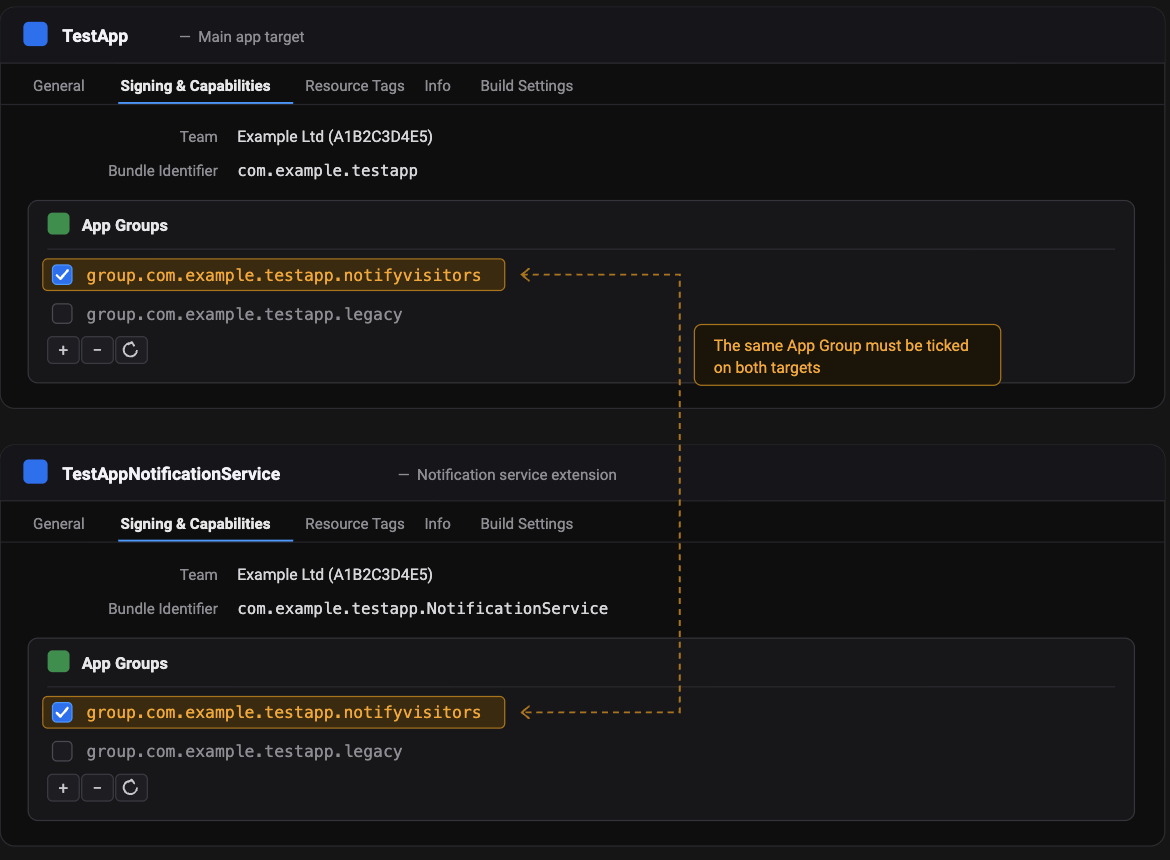
B. Use the symptom to tell the two causes apart
Delivery tracking also depends on Part 3 having passed, because the count is reported from inside the extension.
- Text-only notification: the extension is missing, or the SDK call in the didReceive method is not running.
- Rich notification with a delivery count of 0: the extension works and the App Group does not.
Delivery counts are only recorded for pushes sent after the configuration is corrected, so retest with a new push rather than re-reading an earlier one.
Part 5 — Push click redirection not working
If the notification opens the app but the configured destination is never reached, the click payload is either not arriving, not being read, or being overridden by the app own navigation.
A. Verify the click callback
The click delegate lives in AppDelegate and is registered through registerPush. Registered late in the lifecycle, it never receives the click that launched the app. Confirm the following.
- The AppDelegate class conforms to UNUserNotificationCenterDelegate and is passed as the delegate in notifyvisitors.registerPush(withDelegate:app:launchOptions:).
- The userNotificationCenter didReceive delegate method is implemented and calls notifyvisitors.pushNotificationActionData(from:autoRedirectOtherApps:).
- The willPresent delegate method forwards to notifyvisitors.willPresent(_:withCompletionHandler:), so notifications received in the foreground are handled too.
- didReceiveRemoteNotification forwards to notifyvisitors.didReceiveRemoteNotification(_:fetchCompletionHandler:).
- completionHandler is called at the end of the block.
B. Verify payload handling
The click data arrives as an NSMutableDictionary in the pushNotificationActionData completion block, as pushData. Print it and compare it against your click handling logic.
- The target value decides the destination. Navigate in App is target 0 and Universal Link is target 6, and both have to be handled in your own code.
- The autoRedirectOtherApps parameter decides how much you handle. With false, every click action has to be handled from this block. With true, only target 0 and target 6.
- nvViewAutoRedirection in info.plist controls whether the SDK redirects your view controllers itself. If it is set to NO and the app does not handle the target, the click does nothing beyond opening the app.
- The keys in pushData are case sensitive, so read them exactly as they are printed.
- Deep links open through the app URL scheme, so CFBundleURLTypes and CFBundleURLSchemes have to be set in info.plist, and the openURL delegate method has to forward to notifyvisitors.openUrl(with:url:).
If the app performs its own navigation when a notification is clicked, that takes precedence and the configured redirection never runs.
Quick troubleshooting matrix
| Issue | Where to look | Primary checks |
|---|---|---|
| Push subscribers not showing | Xcode console | Brand ID → permission allowed → APNs device token → Push Subscription ID → subscription API response |
| Error while sending push | Settings > App Push > iOS | Status Active → App bundle Id → Key Id → Team Id → uploaded .p8 or certificate → Environment matching the build |
| Rich push without media | Xcode project | Extension present → SDK imported into the extension → SDK call last in didReceive → direct HTTPS media URL |
| Delivered but stats not coming | Xcode project | nvAppGroupKey identical in both info.plist files → App Group ticked on both targets → extension working |
| Click redirection not working | App code | Delegate registered through registerPush → pushData printed → target 0 and 6 handled → nvViewAutoRedirection → no navigation override |
Updated 4 days ago