
Introduction to Composable CDP
Composable CDP lets NVECTA work directly with the customer data stored in your data warehouse, so you don’t have to move or copy it. You connect your warehouse, tell NVECTA which tables hold your users and which hold their activity, and then analyse that data, build segments from it and use those segments in your campaigns.
Composable CDP supports multiple warehouses including Amazon Redshift, ClickHouse, Snowflake.
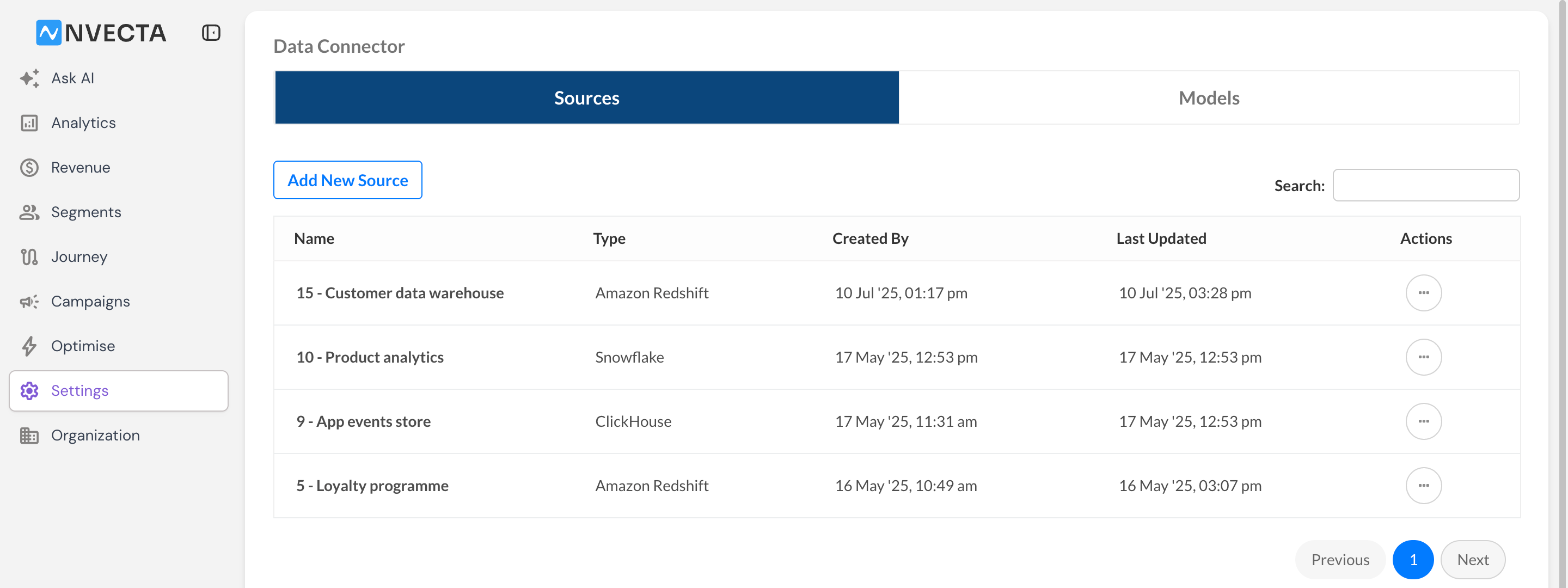
Where: Settings > Data Connector
What you can do with Composable CDP
Once your warehouse is connected and your models are set up, you can use that data across NVECTA:
- Analytics: Event models appear under Model Event in the event picker of Insights, so you can chart warehouse activity alongside your other NVECTA events. See Analytics with Composable CDP.
- Segmentation: Build a Query Based Segment from your models, for example users in Mumbai who have not opened the app in the last 30 days, and target it in your campaigns. See Creating Query Based Segments.
- Third-party syncs: Send a segment out of NVECTA, once or on a recurring schedule, to AWS S3, SFTP, and more, or as a download link by email, from Settings > Export. Published Query Based Segments are listed there like any other segment. To learn more, see Export Users & Events.
Key concepts
Composable CDP is built on two objects: sources and models. A source connects NVECTA to your warehouse, and a model tells NVECTA what the data in that warehouse means.
Sources
A source is a secure connection from NVECTA to one of your warehouses. You add it once, using a database user that can read the tables you want to use, and NVECTA tests the connection before it is saved. You can connect directly, through a VPN tunnel or through an SSH tunnel, and you can add more than one source.
Where: Settings > Data Connector > Sources
For the full steps, see Setting up sources and models.
Models
A model describes one table in your warehouse, or the result of a SQL query, so that NVECTA can use it. You build a model from a table with Table Selector or from your own query with SQL Query, and then set its Table Type to User table or Event Table.
- User model: One row per user. It holds who the user is: their user ID, email, mobile and profile details such as city or plan. You map its columns to the NVECTA identifiers userID, email and mobile with the Same Model option.
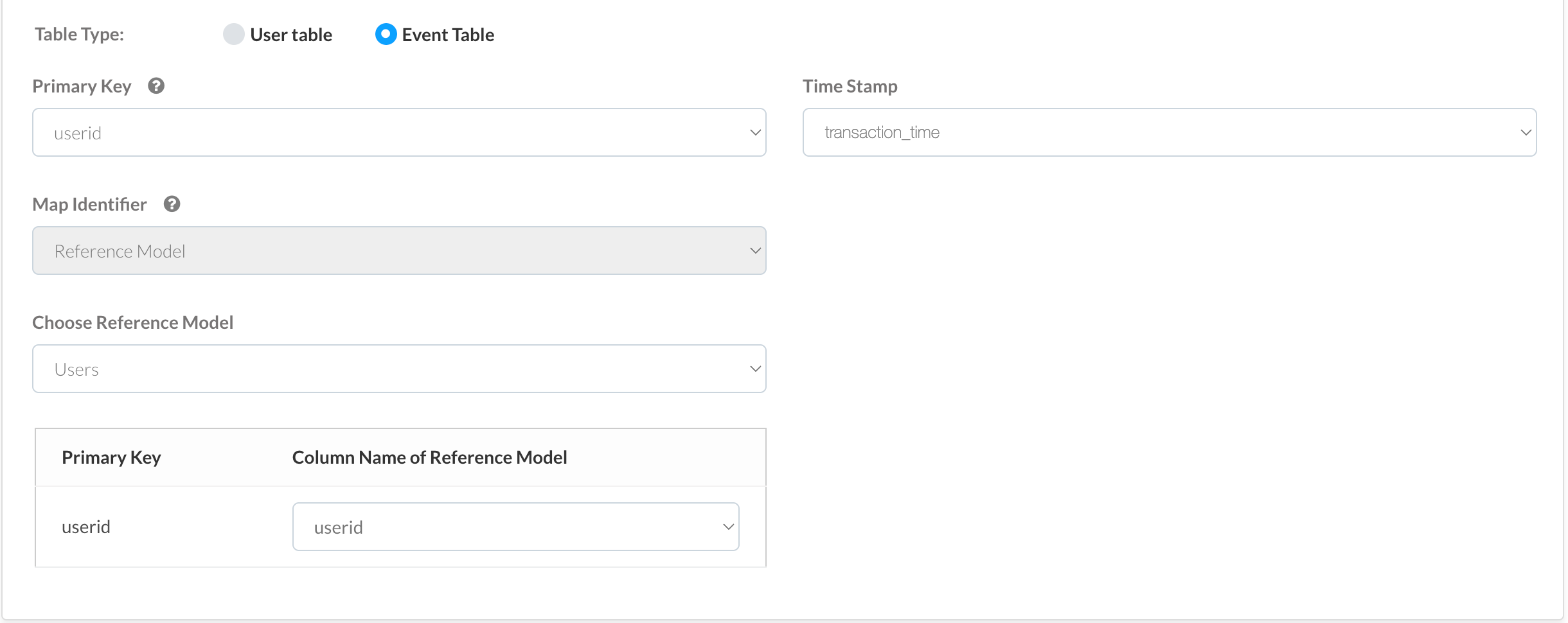
- Event model: One row per action a user took, such as a transaction, a login or an order. It needs a Time Stamp column that records when the action happened, and it links to a user model with the Reference Model option.
Where: Settings > Data Connector > Models
For the full steps, see Setting up sources and models.
How user and event models connect
Every segment, report and campaign in NVECTA is built around users. So before you create models, your warehouse needs:
- One user master table: A single table, or SQL query, with one row per user, a column that uniquely identifies each user (such as a user ID, email or mobile number) and the identifiers NVECTA uses to reach them, such as email and mobile.
- Event tables that carry the same key: Each event table, such as transactions or logins, must include a column with the same values as the master table's unique column, so that every row can be traced back to a user in the master table.
Event tables usually do not contain the user's email or mobile. Instead, when you create an event model, you choose the user model in Choose Reference Model and match the event model's Primary Key with the user model's Primary Key under Column Name of Reference Model. Both columns must hold the same value, such as a user ID, email or mobile number. NVECTA then reads the email, mobile and profile details for each event from the user model.
For example, an app might keep these two tables:
users (user model)
| userid | mobile | city | |
|---|---|---|---|
| 101 | [email protected] | 9876500001 | Mumbai |
| 102 | [email protected] | 9876500002 | Pune |
transactions (event model)
| userid | transaction_id | product_id | amount | transaction_time |
|---|---|---|---|---|
| 101 | T1001 | P2001 | 1499.00 | 2026-10-20 10:15:00 |
| 101 | T1002 | P2044 | 899.00 | 2026-10-24 18:30:00 |
| 102 | T1003 | P2001 | 1499.00 | 2026-10-21 09:05:00 |
The users table identifies each user by userid and holds the identifiers NVECTA needs to reach them, email and mobile. An event table uses the same userid to record who did each action, its event attributes and when they did it. In the transactions table above, the attributes are transaction_id, product_id and amount, and transaction_time records when each transaction happened.
So users is created as a user model with userid as its Primary Key, and transactions is created as an event model with userid as its Primary Key, transaction_time as its Time Stamp and users as its reference model. NVECTA can then tell that user 101 made two transactions, for products P2001 and P2044, and reach them at [email protected].
Use the same data type for the user ID in every table, and make sure the user ID column holds actual user IDs. If it holds other values, such as dates, events cannot be matched to users.
This follows the same idea as NVECTA's own data model, where user profiles and events are joined by a user identifier. To learn more, see Data Structure.
Why use Composable CDP
- No data migration: Your data stays in your warehouse, and NVECTA reads it from there.
- One source of truth: Segments and reports use the same tables your data team already maintains.
- Flexible modelling: Use tables as they are, or write SQL to filter, join and reshape them before NVECTA uses them.
Updated about 2 hours ago